
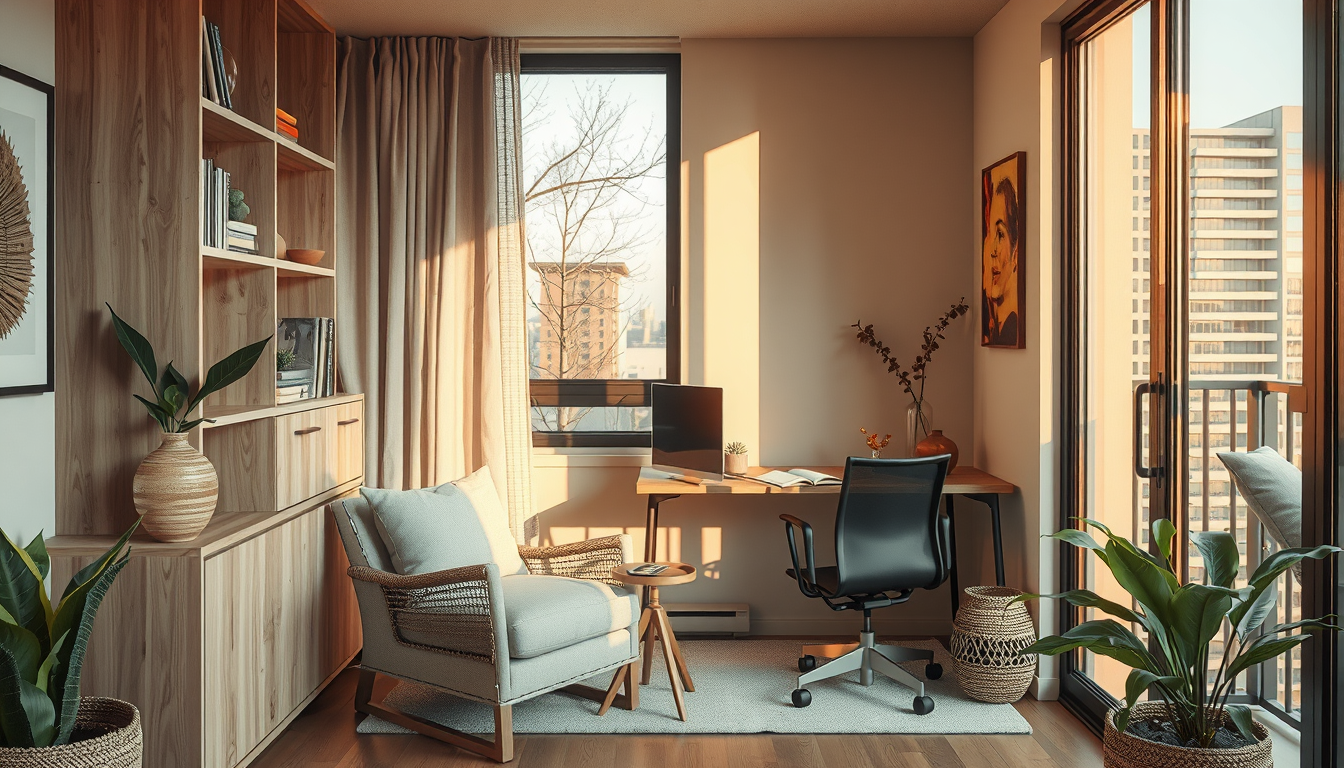
desk facing door feng shui works best when you can see the entrance without sitting in its direct path, keep the monitor perpendicular to the window, and preserve about 90 cm behind the chair. Place the screen roughly one arm’s length away to support a practical, ergonomic Toronto home office (CCOHS, “Office Ergonomics—Positioning the Monitor”).
Last updated: April 1, 2026 Meta description: Plan desk facing door feng shui for a Toronto home office with practical layouts, ergonomic measurements, glare fixes and Canadian pricing. Affiliate disclosure: Toronto Interior Designer has no affiliate relationship with the products or retailers mentioned in this guide.
The five most useful upgrades are a clear entrance sightline, controlled window glare, comfortable chair clearance, an ergonomic monitor position and storage that keeps shared rooms functional. Traditional feng shui informs the sightline, but ergonomics, circulation and daylight should determine the final layout.
What Does Desk Facing Door Feng Shui Mean?
Traditional feng shui places the desk in a “command position”: you can see the entrance, but your chair is not directly aligned with the doorway (International Feng Shui Guild, “Command Position”). Practitioners also favour a solid wall behind the chair, although these principles have not been scientifically proven to increase productivity.
In practical design terms, the entrance should fall within your natural field of view. The chair must remain outside the door swing, and the workstation should not force people to squeeze through an occupied work zone.
A wall behind the chair may feel more settled than an exposed walkway, but that response is personal. We treat command position as a layout preference and test it against ergonomics, daylight and circulation.
The practical value of command position is a workstation where you can notice arrivals, move comfortably and avoid disruptive screen glare.
Which Desk Facing Door Feng Shui Layout Works Best in a Toronto Condo?
Shop Compact Work-From-Home Staples
Desks, task lamps, and shelving do more for a condo office than oversized furniture that eats the room.
Toronto Interior Designer may earn a commission if you shop through these links at no extra cost to you.
A diagonal view of the entrance is the strongest starting point for most condo offices. Rotate the monitor approximately 90 degrees to the nearest window so daylight does not fall directly onto the screen or sit immediately behind it (CCOHS, “Office Ergonomics—Lighting”).
Aim for approximately 90 cm between the chair and the nearest wall or obstruction. This is our planning target, not an Ontario Building Code minimum. A tighter 75 cm clearance can function in a compact den if it does not block a doorway, required exit or accessible route.
Upgrade 1: Create a diagonal door sightline
Position the desk so you can glance toward the door without turning your torso. Avoid centring the chair directly opposite the opening because that arrangement can place the workstation in the main circulation path.
When we plotted a 1.8-by-2.1-metre condo den, a shared dining area and a larger room in a Junction semi, the diagonal arrangement produced the clearest circulation in the den. The shared room worked better with the desk facing a wall and a carefully placed mirror providing the entrance view.
Mark the desk, chair and door swing with painter’s tape before purchasing furniture. Explore our home-office guides for more small-space planning ideas.
Upgrade 2: Turn the monitor away from direct glare
Place the monitor perpendicular to the main window whenever the room permits. CCOHS recommends controlling glare through workstation orientation, blinds and adjustable lighting instead of relying solely on screen brightness (CCOHS, “Office Ergonomics—Lighting”).
South- and west-facing Toronto condo units can experience intense afternoon light, so test the screen at the time of day when you normally work. Solar shades, adjustable blinds or lined drapery can reduce direct light while preserving some daylight.
A mirror used for door awareness should not reflect a bright window into the screen. Our Rosedale statement-mirror placement guide explains how reflected light and sightlines affect narrow interiors.
Upgrade 3: Protect chair and door clearance
Provide about 90 cm behind the chair where space permits. That distance gives many users room to sit down and move away from the desk, but it remains a design target rather than a universal code requirement.
In a CityPlace den, 75 cm may be a reasonable compromise when the chair does not obstruct the door or another circulation route. Test the layout with the chair pulled back to the position used when standing, not neatly tucked beneath the desk.
Balcony doors require particular care because furniture must not interfere with the operable panel. See our windy condo balcony guide when a workstation connects directly to an exposed outdoor area.
What Desk Size and Budget Should You Plan For?
Choose desk depth before width. A 50-centimetre-deep desk may suit a laptop nook, while a 60–80-centimetre depth provides more room for a separate monitor, keyboard and cable management.
The following figures are representative planning ranges based on Canadian product listings; actual prices vary by finish, delivery fees, promotions and availability (IKEA Canada; Staples Canada; EQ3).
| Desk or setup | Planning price (CAD) | Typical footprint | Best suited to |
|---|---|---|---|
| Compact fixed desk | $130–$250 | 100 × 50 cm | CityPlace den or bedroom corner |
| Standard work desk | $250–$600 | 120 × 60 cm | Dedicated condo office |
| Manual sit-stand desk | $350–$650 | 120 × 70 cm | Flexible shared room |
| Electric sit-stand desk | $500–$1,200 | 120–160 × 70–80 cm | Full-time hybrid work |
| Canadian-designed wood desk | $1,000–$2,500 | About 130 × 60 cm | Junction semi or larger office |
Upgrade 4: Match the desk to the equipment
A 120-by-60-centimetre desk is a versatile starting point for a separate monitor, keyboard and mouse. Measure the usable depth after accounting for baseboards, cable trays, monitor stands and rear cable gaps.
Before ordering, test comparable desks at Toronto retailers such as CB2 on Queen Street West or EQ3’s Toronto showroom. Bring your laptop and note whether the display desk keeps the keyboard close while leaving the monitor approximately one arm’s length away (CCOHS, “Office Ergonomics—Positioning the Monitor”).
Compare materials, dimensions and delivery considerations in our Canadian furniture buyer guides.
Why Can a Desk Facing the Door Improve Focus?
Seeing the entrance may reduce how often you turn around when somebody arrives, but research does not establish that feng shui desk direction directly improves productivity. Any improvement in focus should be treated as an individual response rather than a guaranteed result.
Ergonomic recommendations provide firmer planning guidance. CCOHS advises positioning the monitor about one arm’s length away, with its top at or slightly below eye level (CCOHS, “Office Ergonomics—Positioning the Monitor”). The keyboard and mouse should remain close enough for the elbows to stay near the body (CCOHS, “Office Ergonomics—Keyboard and Mouse”).
Upgrade 5: Build an ergonomic work zone
Adjust the chair before deciding the final monitor height. CCOHS recommends a stable chair with suitable seat, backrest and adjustment features rather than a single chair configuration for every user (CCOHS, “Office Ergonomics—Work Chairs”).
Keep frequently used items within comfortable reach. Closed storage can reduce visual clutter in a shared room, while a mobile pedestal allows the work zone to be cleared when a dining table returns to household use.
For video calls, we typically test approximately 75–120 cm between the chair and visible background. This is our planning range, not a building standard; the best distance depends on the camera lens, room size and desired frame.
What Should You Do When Your Desk Cannot Face the Door?
Keep the ergonomically stronger position and solve the blocked entrance view separately. A small mirror or reflective cabinet panel can provide awareness of the doorway without forcing the monitor into window glare.
A wall-facing desk often works better in a 50-centimetre-deep nook because it preserves circulation. Install a mirror above or beside the monitor only after checking that it does not reflect direct daylight or private areas into video calls.
How can a shared room stay flexible?
Choose a desk under 60 cm deep when a home office must share a dining room or bedroom. Closed cabinets, a mobile pedestal and removable cable management make it easier to restore the room after work.
Keep office equipment away from the bed where possible and switch off visually distracting indicator lights at night. Visit our living-space planning ideas and bedroom design guidance for multipurpose-room layouts.
Renters should favour freestanding storage and removable cable organizers, subject to the lease. Condo owners should review their corporation’s declaration, bylaws and rules before drilling concrete or scheduling contractors because corporations may regulate renovation procedures and permitted work hours (Condominium Authority of Ontario, “Rules”).
Do you need a permit for office improvements?
Moving a desk or adding ordinary freestanding shelving does not require a Toronto building permit. Structural alterations and certain plumbing, mechanical or wall changes may require one (City of Toronto, “When Is a Building Permit Required?”).
Electrical work is regulated separately. Most electrical installation work in Ontario must be reported to the Electrical Safety Authority unless a stated exemption applies (ESA, “Electrical Safety and the Law”).
A basement office may raise additional questions about exits, insulation, ventilation and electrical work. Consult our Rosedale basement permit-upgrade guide and Toronto renovation guidance before beginning construction.
How Should Comfort, Light and Workflow Shape the Final Plan?
Ergonomics should take priority when it conflicts with a symbolic door orientation. Begin with chair adjustment, screen height, viewing distance and glare control; then angle the desk toward the entrance if circulation remains comfortable.
CSA Z412:17, reaffirmed in 2022, provides Canadian guidance for office workstation design and adjustability (CSA Group, Office Ergonomics—An Application Standard for Workplace Organizations). CCOHS also recommends selecting a chair that supports the user and permits appropriate adjustment (CCOHS, “Office Ergonomics—Work Chairs”).
For task lights, extension cords and surge protectors, select products carrying a certification mark recognized in Canada. The ESA lists CSA, cUL and cETL among recognized marks and states that unapproved electrical products must not be used in Ontario (ESA, “Recognized Certification Marks”).
Our recommendation
Start with a 120-by-60-centimetre desk placed diagonally to the door. Keep the monitor perpendicular to the window, roughly one arm’s length from your eyes, and provide approximately 90 cm behind the chair where the room allows (CCOHS, “Office Ergonomics—Positioning the Monitor”; Toronto Interior Designer planning recommendation).
Choose a wall-facing layout when a narrow den, shared dining room or bright window makes the command position uncomfortable. A well-positioned mirror can preserve the entrance sightline without sacrificing screen ergonomics.
What Should You Check Before Finalizing the Layout?
Mark the desk and chair footprint with painter’s tape, then test the setup during normal working hours. The following dimensions are starting points and should be adjusted for the user, mobility requirements and product instructions.
- Confirm that the door opens fully without touching the chair or desk.
- Keep the entrance visible directly or through a glare-free mirror.
- Aim for approximately 90 cm behind the chair where space permits.
- Position the monitor about one arm’s length away (CCOHS).
- Set the screen top at or slightly below eye level (CCOHS).
- Turn the monitor approximately 90 degrees to the main window (CCOHS).
- Keep the keyboard and mouse close enough for relaxed shoulders and elbows (CCOHS).
- Check the video-call frame for doors, reflections and personal information.
- Verify condo rules before drilling walls or arranging contractor access (Condominium Authority of Ontario).
- Select electrical accessories with an ESA-recognized certification mark (ESA).
- Obtain three quotes for custom built-ins because labour, site conditions and condo access can affect pricing.
- Reassess the arrangement after five working days and adjust it for actual tasks.
Sources
- Canadian Centre for Occupational Health and Safety. “Office Ergonomics—Positioning the Monitor.”
- Canadian Centre for Occupational Health and Safety. “Office Ergonomics—Lighting.”
- Canadian Centre for Occupational Health and Safety. “Office Ergonomics—Keyboard and Mouse.”
- Canadian Centre for Occupational Health and Safety. “Office Ergonomics—Work Chairs.”
- CSA Group. CSA Z412:17 (R2022), Office Ergonomics—An Application Standard for Workplace Organizations.
- City of Toronto. “When Is a Building Permit Required?”
- Condominium Authority of Ontario. “Rules.”
- Electrical Safety Authority. “Electrical Safety and the Law.”
- Electrical Safety Authority. “Recognized Certification Marks.”
- International Feng Shui Guild. “Command Position.”
- IKEA Canada, Staples Canada and EQ3. Canadian desk and home-office product listings consulted for representative CAD planning ranges.
Frequently Asked Questions
Should a desk face the door according to feng shui?
Yes. Traditional feng shui recommends seeing the door without sitting directly in line with it, while a practical layout should also preserve about 90 cm behind the chair where possible (International Feng Shui Guild; Toronto Interior Designer planning recommendation).
Is it bad to sit with your back to the door?
No. Scientific evidence does not establish that sitting with your back to the door reduces productivity, and a small mirror can restore the sightline while the monitor remains about 1 arm’s length away (CCOHS).
How far should a monitor be from your eyes?
Place it approximately 1 arm’s length from your normal seated position (CCOHS). Keep the screen top at or slightly below eye level, although users of bifocals or progressive lenses may require a lower position (CCOHS).
How much clearance should be left behind an office chair?
Aim for approximately 90 cm where the room permits. A 75 cm clearance may function in a compact condo den if the chair does not block a doorway, required exit or accessible route.
What desk size works in a small Toronto condo?
A desk approximately 100 cm wide by 50 cm deep can accommodate a laptop or compact monitor in many small work zones. A 120-by-60-centimetre desk offers more equipment space but requires careful chair and door-clearance checks.
Does a Toronto condo board control home-office renovations?
Yes. A condominium corporation may regulate drilling, contractor access, renovation deposits and working hours, while electrical alterations may separately require an ESA notification (Condominium Authority of Ontario; ESA).
Toronto Interior Designer Editorial Team | Interior Design Research Team The Toronto Interior Designer Editorial Team produces evidence-led planning guidance for Toronto and GTA homeowners, condo residents and renters. Its work focuses on practical layouts, Canadian standards and the constraints of compact urban homes. (/author/editorial-team/)
Make the Setup Feel Finished
Upgrade your office corner with better lighting, smarter storage, and one or two elevated pieces that keep it from feeling temporary.
Toronto Interior Designer may earn a commission if you shop through these links at no extra cost to you.
Frequently Asked Questions
Should a desk face the door according to feng shui?
Traditional feng shui recommends seeing the door without sitting directly in its path. Where possible, leave about 90 cm behind the chair while maintaining safe circulation.
What if my desk cannot face the door?
Keep the most ergonomic layout and use a small mirror for a reflected entrance view. Position the monitor about one arm’s length away and perpendicular to the window to reduce glare.
What desk size suits a small Toronto condo?
A 100-by-50-centimetre desk suits many compact condo work zones. A 120-by-60-centimetre desk offers more workspace but requires careful doorway and chair-clearance checks.
Toronto Interior Designer is editorially independent. Our recommendations are based on research and editorial judgment, not brand sponsorships.